
Leaving cows
This post is also available on:

Note: To transfer or save the transfer file, an online client (external transfer program) must be set up and the recipient must be registered as such. The settings for creating the transfer file can be made later.
- Disk (e.B. flash drive or hard drive)
- E‑mail
- Open Capture animal >
 Movement >
  Leaving
- Capture the leaving of animals
- The recipient must be marked with transfer (see
 Organization >
  Settings > Keys > Recipient)
- easy | without medication
- completely | with medication
Creating the transfer file
- Open Organization >
 Export > Leaving cows
- Select the online client to send or save the file
- Select the recipient to receive the file.
- Set one
 to mark all animals or mark individual animals for transfer by a pet
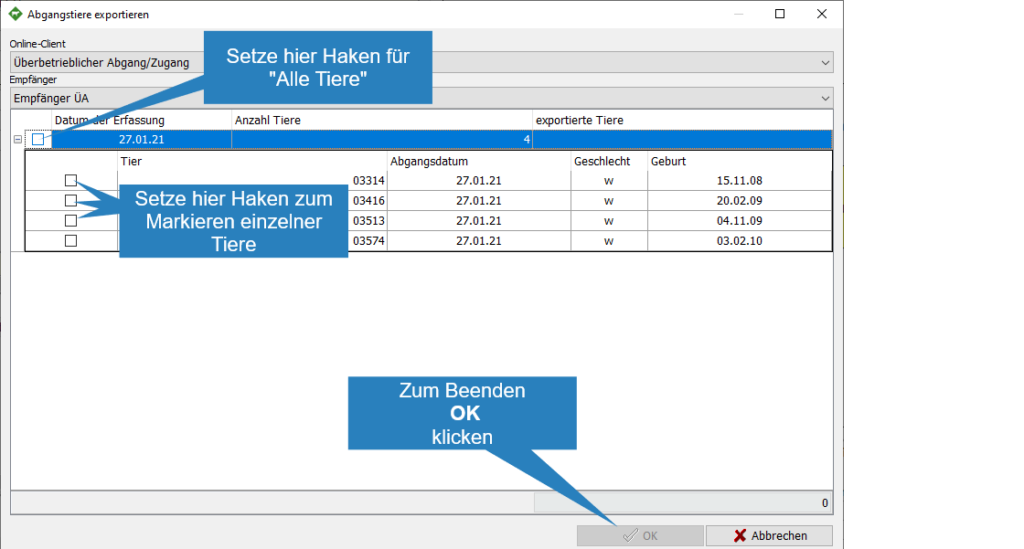
- To create the transfer file, click OK
- The transfer file was placed in the location