
FAQ – Frequently Asked Questions
This post is also available on:

 What is the difference between insemination, breeding, use of mating bull?
 There are different types of breeding.
Insemination | artificially insemination is done by a technician
Breeding on date | Natural breeding by a mating bull (observed natural jumping of a bovine).
Breeding in period | Natural breeding by a mating bull (natural jumping in period on a bovine).
Use mating bulls | in one / several groups, the natural jumping takes place in period with several bovines
Is there a difference in the use of the Animal identification of 5-digit and Barn number ?
Yes, if ear tag has been briefly set as animal identification. See here.
This setting is required if there are at least 2 animals in the animal population whose last 5 digits are identical in the live ear tag. (5-digit)
The stable number is the correct one for the animal number used only if it is the only one used in capture. The use of ear tag short (the last 5 digits, or 5 digits)must NOT be used in the recording.
How to get a list of expected calving for a period (from/to)
choose one of these most common solutions
In the tab stock with held CTRL key click on Pregnant and Dry, then activate the column Events > Calving
In Analysis Calving/Estimated calving to mark the respective animals in the relevant months. The animal list is then all animals included
In the problem animal list you can automatically view the animals according to your own specifications continuously
In the calendar, mark the desired time period. In animal list, use filter and order by calving
How can I export an animal list as  a CSV?
Select the animals in the herd or analysis and click  . In the File Type drop-down box, select Save Ear Numbers as a CSV File. In this case, the ear tags are always exported 15 digits, without any further columns of the display.
Where can I find an overview of the BU/Group?
Click on Stock > Groups in Tab Analysis
Why doesn’t the waiting time of a medication change if I edit it afterwards?
All waiting times are blocked before the change from central location and must be updated individually for each animal by correcting animal health.
How to set the admin password?
After the user management has been activated, the user admin is created automatically. No password is created for this one. The next time you start the HERDEplus, click OK without entering a password. Then open  Organization > Change password and enter a password.
In the user management, the admin is rightly excluded, so that users with less rights cannot overwrite the password to the admin.
Is it possible to correct collected data?
Yes, go to the Info animal and click the  lock. Then open the tab of the action and click on the line to be deleted or corrected. Delete the
  entry or
  edit the entry.
See Correcting data
What is the difference between export and “XLS”, “CSV” and “ear numbers as CSV”
See the following table
Exports max. 65000 rows* with all displayed columns
with formatting
*Depending on the office version used
Exports all rows with all columns
without formatting
Exports only the ear tags of all displayed animals in 15-digit format, no matter which display is currently selected
None formatting
Is it possible to set different dry standing times?
Yes, see Organization >  Settings > Keys > Program > Breeds can be set for all breeds for the 1st lactation and cows from 2nd lactation the dry standing time. In addition, the Gestation period is shortened when capture a multiple pregnancy.
What does re-introduction mean?
The time of re-introduction is the date when the animal must be seen again in order to get a new picture of the animal’s state of health. With mastitis treatment it can be one day, with post-treatment for claw disease 7 days or with vaccination 28 days.
Why is it mandatory to re-introduce a re-examination with a healthy result in the sterility examination?
If no medical findings were found during the sterility examination, but the animal also showed no symptoms of brunch (otherwise it would be inseminated or presented for pregnancy examination), then a date must be set to reassess the further procedure with the animal.
Otherwise it could happen that in case of still-heat the animal is never presented again for insemination.
Why can’t I change the font size in HERDEplus?
A change is not possible as long as the Windows display is not set to 100%. To do this, open the Windows display settings and set the Windows font size to 100% and log off from Windows and back on. Then click on Organization > Settings > Display and Capture and set the font to your choice.

What should I do if the action plan doesn’t appear in the calendar?
If the action plan has been drawn up, it will take time for the animal calculation to be completed. Check the calendar by clicking on  whether the action plan you are looking for and the associated actions are active.
How can I start recalculation of the action calendar?
In the action calendar, click the drop-down arrow to the left of  Refresh, and then click
  Recalculation.

Why can’t I capture Flushing (ET)?
Is insemination been captured with characteristic as a Donor?
How are the days after insemination calculated and displayed in Info animal?
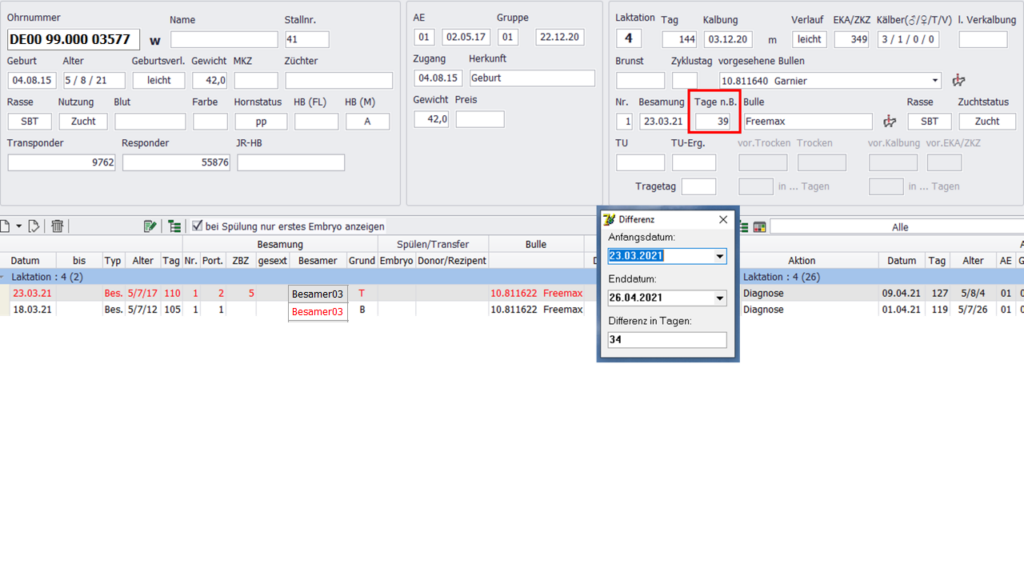
Even if, as shown in the picture, an animal was inseminated again within 5 days, the calculation of the “days a.i.” always used the date of the first insemination. As shown in the example, there are 34 days between the 2nd insatiation and the current date, but 39 days are displayed. The displayed value (red box) results from the date of the previous insemination (18.03.2021).
An exception to this calculation is the creation of the BHE worklist. Here, the date of the last insemination is used to calculate the appointment (in the example 23.03.2021) in order to exclude incorrect insemination.
Is it possible to add additional information to a delivery note?
To insert additional information when leaving animals with delivery note, follow the instructions:
Hint:
To enter additional information on the delivery note, the existing organization can be used under Settings > > Farm Data.
Additional organizations can also be created under Settings > Keys > Organizations .